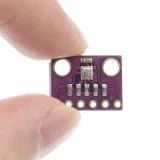
SKU: OT711-D64 Varenummer: NB078 EAN: 4184669585804

OBS 3.3V version. Velegnet til ESP8266, ESP32, Wemos D1 etc.
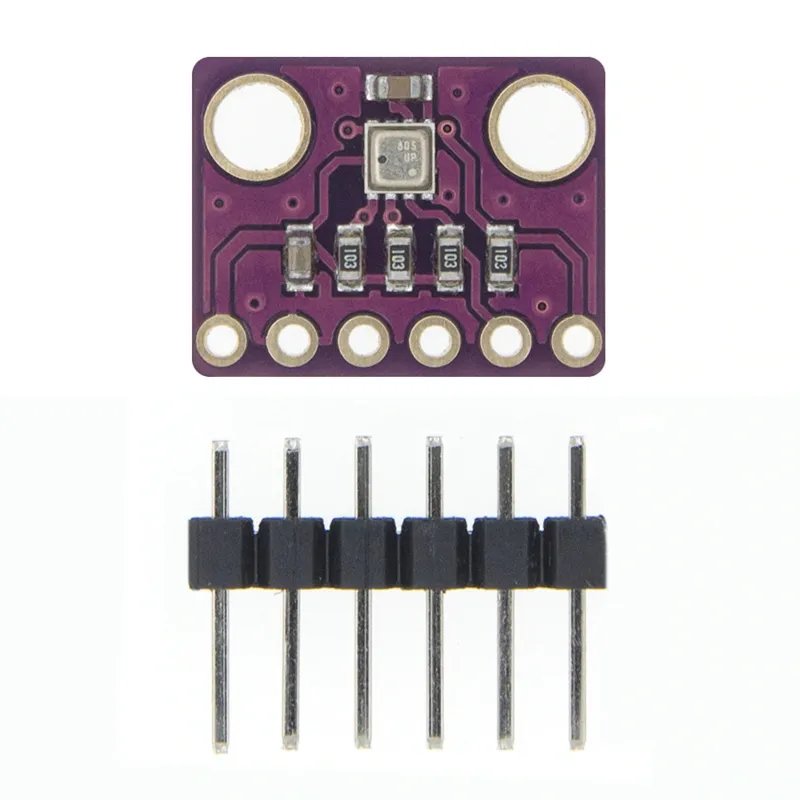
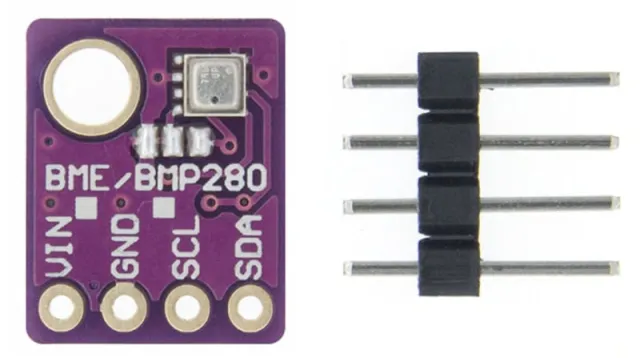
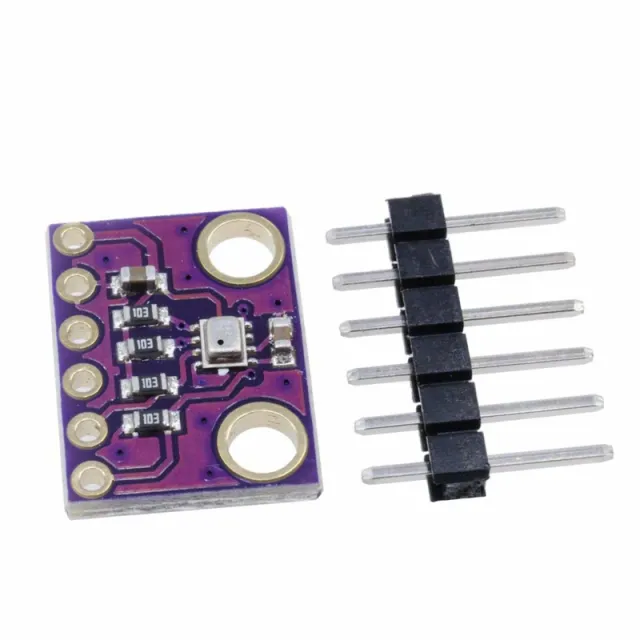
GY-BME280 er et Breakout Board med en Bosch Sensortec ME280 Temperatur-, Luftfugtigheds- og Lysdruksensor.
Boardet har en valgfri I2C-adresse (loddebro GS2)
- I2C pull-up modstande
- Inkluderer 7 pin header 2.54mm
- to monteringshuller på 3.5mm.
BME280 Egenskaber
- Mærke sensor: Bosch
- Sensorstørrelse 2.5mm x 2.5mm x 0.93mm metalcover LGA
- Digital interface I2C (op til 3.4 MHz) og SPI (3 og 4 ledere, op til 10 MHz)
- Forsyningsspænding: 3V til 3.6 V
- Strømforbrug 1.8 uA @ 1Hz fugtighed og temperatur, 2.8 uA @ 1Hz tryk og temperatur. 3.6 uA @ 1Hz fugtighed, tryk og temperatur og 0.1 uA i dvaletilstand
- Område temperatursensor -40 / +85 C,
- Område luftfugtighed; 0 - 100% rel. Luftfugtighed
- Område lufttryk: 300- 1100 hPa
- Både I2C og SPI
Afmetingen
Lengte: 1,47cm
Breedte: 1,14cm
Hoogte: 0,23cm
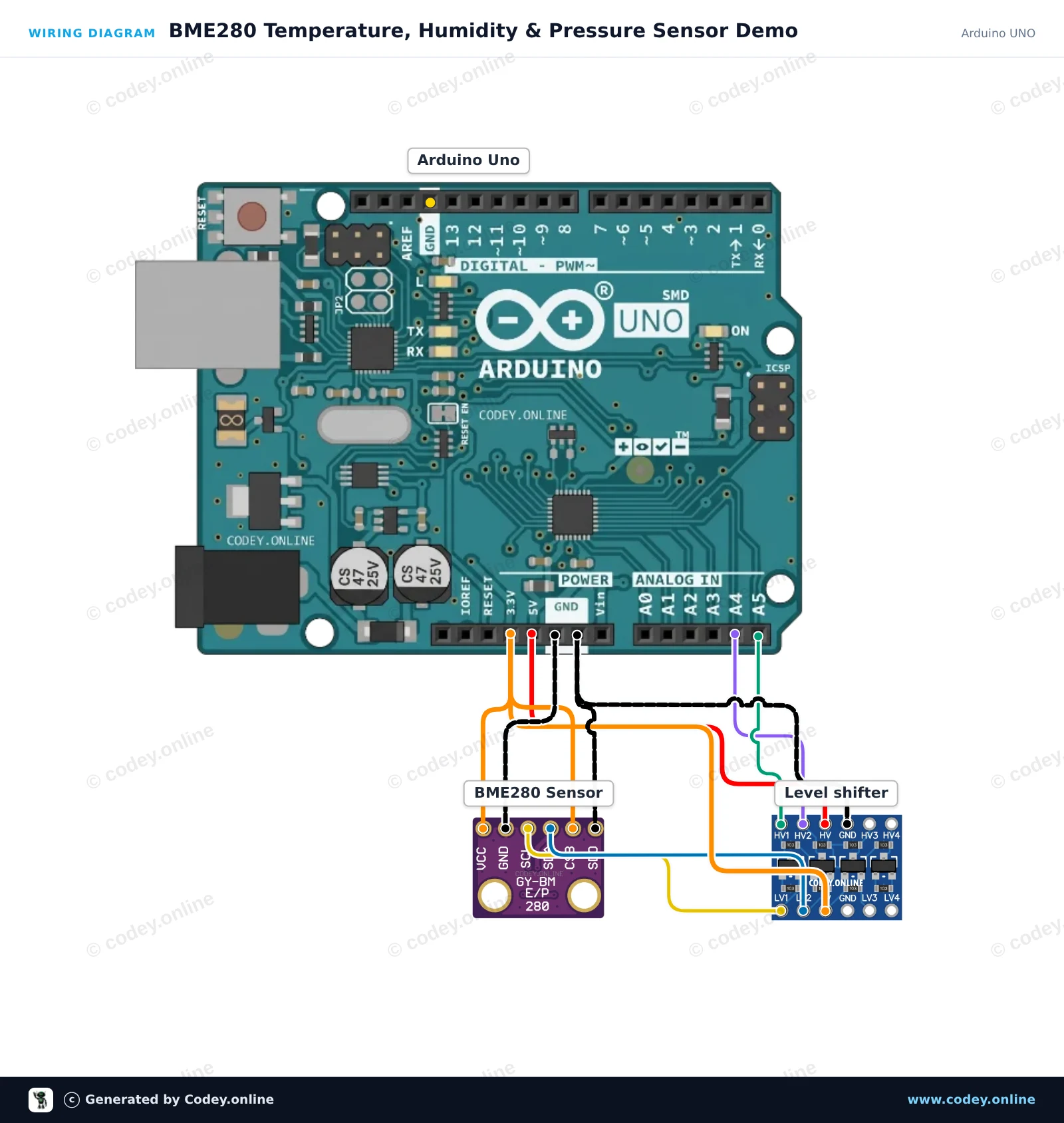
Sådan tilslutter du 3-i-1 sensor Temperatur Luftfugtighed og Lufttryk | 3.3V | I2C og SPI | Bosch BME280 til en Arduino UNO eller ESP32, med en eksempelsketch, du kan uploade med det samme.
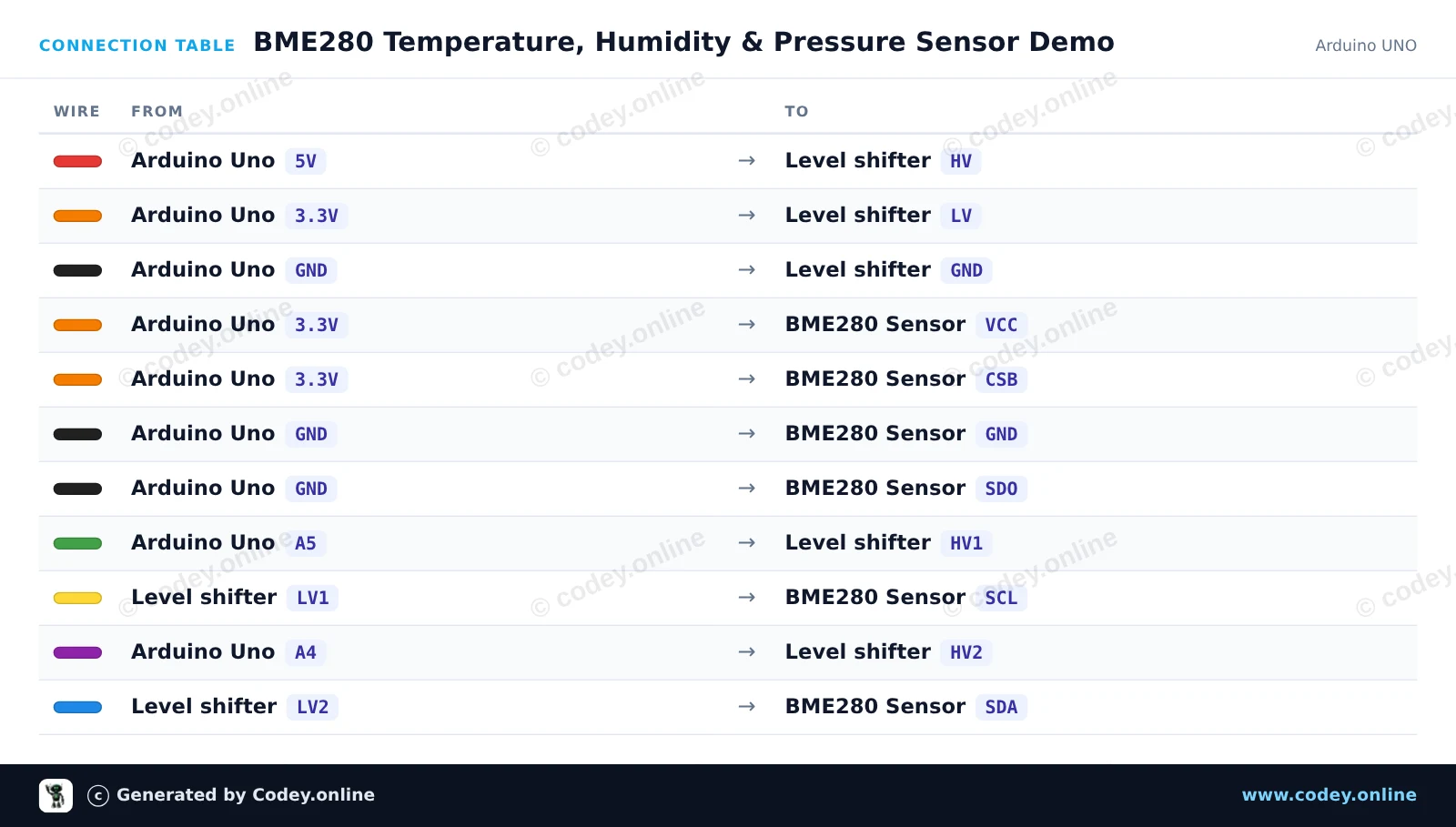
Dette projekt aflæser omgivelsestemperatur, relativ luftfugtighed og atmosfærisk tryk ved hjælp af en 3.3V BME280-sensor, der er tilsluttet en Arduino Uno. En 4-kanals bidirektionel logic level shifter omsætter sikkert de 5V I2C-signaler ned til 3.3V. Sensoraflæsningerne sendes til Serial Monitor hvert andet sekund.
/*
 * ==================================================================
 *  Generated by Codey.online  —  https://www.codey.online
 * ==================================================================
 *  Project   : BME280 Temperature, Humidity & Pressure Sensor Demo
 *  Board     : Arduino UNO (arduino:avr:uno)
 *  Parts     : Bosch BME280 3.3v 3-in-1 sensor Temperature Humidity and Air Pressure
 *  Libraries : Adafruit BME280 Library 2.3.0, Adafruit Unified Sensor 1.1.15
 *
 *  Codey Online is an AI-powered browser IDE for Arduino and ESP32.
 *  Describe your project and Codey writes the code, draws the wiring
 *  diagram and uploads it to your board, straight from the browser.
 *  This code is free to use, modify and share, without warranty.
 * ==================================================================
 */

#include <Wire.h>
#include <Adafruit_Sensor.h>
#include <Adafruit_BME280.h>

Adafruit_BME280 bme;

void setup() {
  Serial.begin(115200);
  while (!Serial) delay(10);

  Serial.println(F("Initializing BME280 sensor..."));

  // SDO tied to GND sets address to 0x76
  if (!bme.begin(0x76, &Wire)) {
    Serial.println(F("Could not find BME280 sensor. Check wiring!"));
    while (1) delay(100);
  }

  Serial.println(F("BME280 sensor ready!"));
}

void loop() {
  float temperature = bme.readTemperature();
  float humidity = bme.readHumidity();
  float pressure = bme.readPressure() / 100.0F; // Convert Pa to hPa

  Serial.print(F("Temperature: "));
  Serial.print(temperature, 1);
  Serial.print(F(" °C | Humidity: "));
  Serial.print(humidity, 1);
  Serial.print(F(" % | Pressure: "));
  Serial.print(pressure, 1);
  Serial.println(F(" hPa"));

  delay(2000);
}Nødvendige biblioteker: Adafruit BME280 Library 2.3.0, Adafruit Unified Sensor 1.1.15
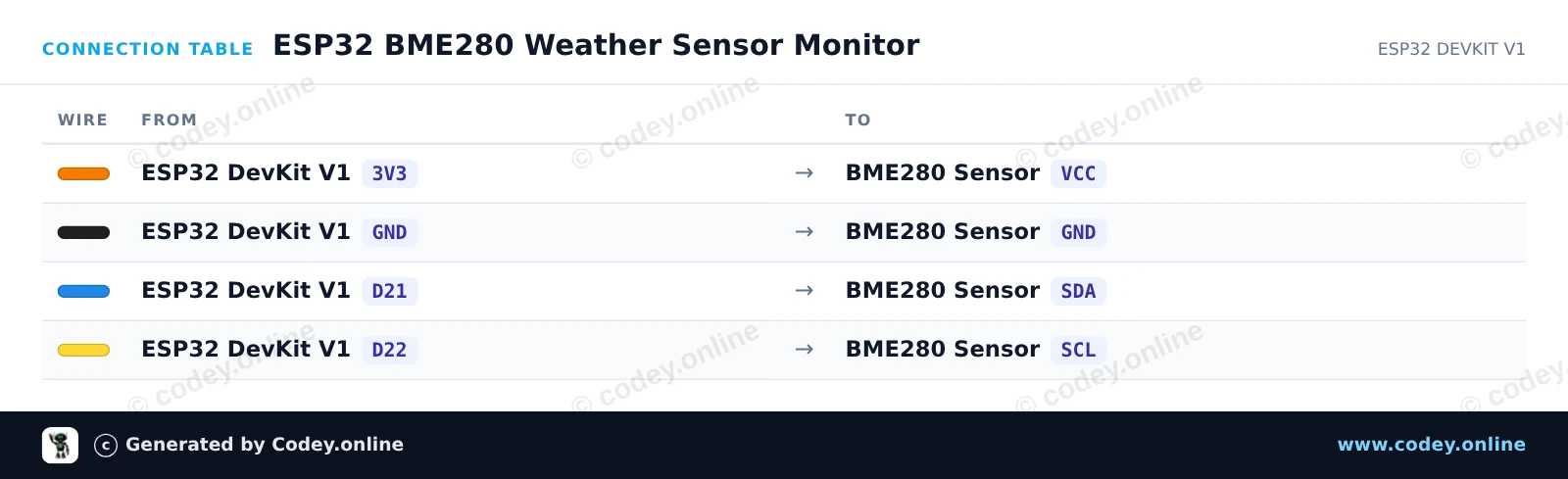
Wiring diagram and example code generated by Codey.online — https://www.codey.online
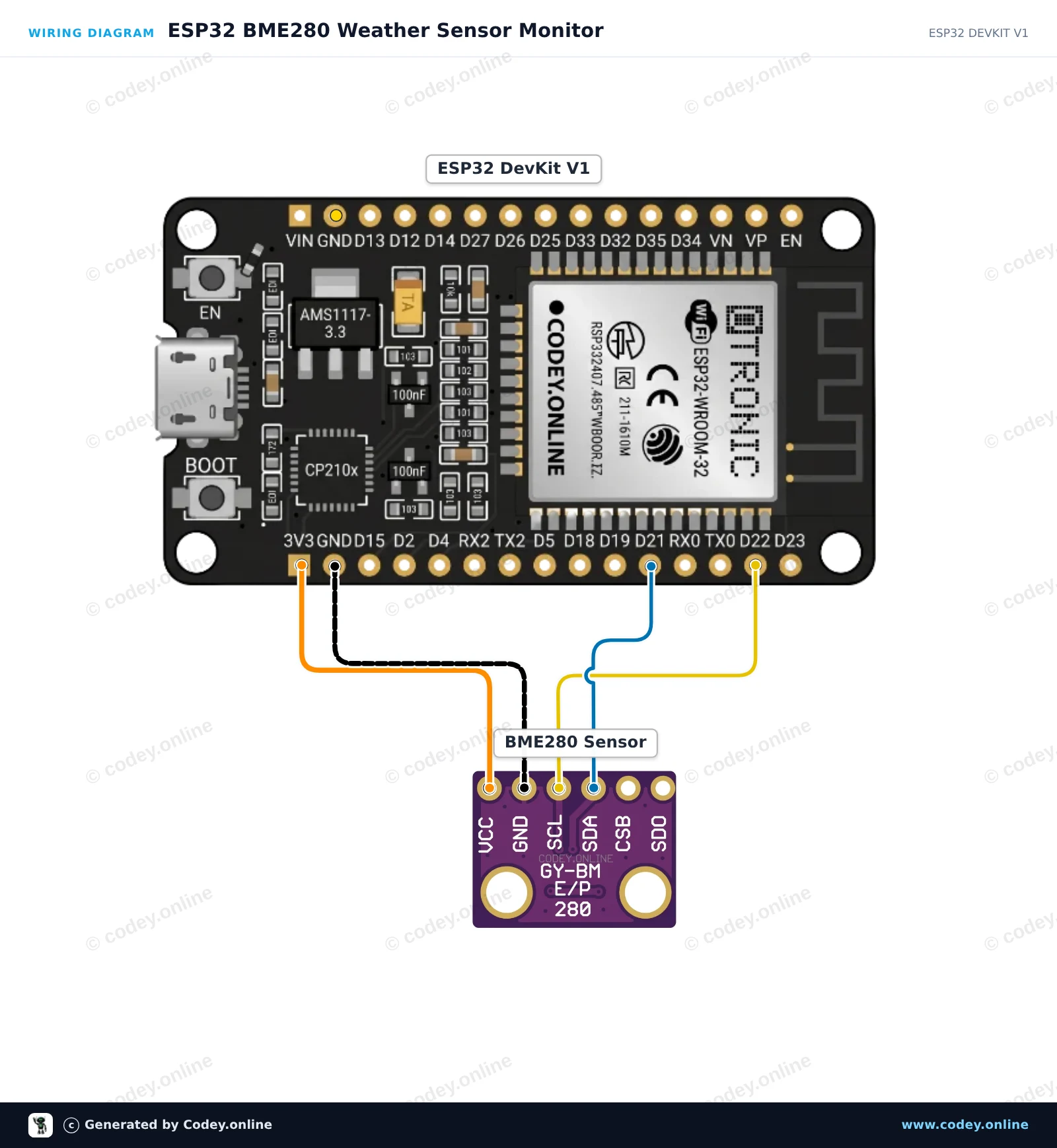
Dette projekt aflæser omgivelsestemperatur, relativ luftfugtighed og barometertryk fra Bosch BME280-sensoren via I2C-grænsefladen. Tilslut 3.3V-sensoren direkte til ESP32's strømforsyning og de standard I2C-ben (GPIO 21 og 22). Åbn Serial Monitor ved 115200 baud for at se miljømålinger i realtid, opdateret hvert andet sekund.
/*
 * ==================================================================
 *  Generated by Codey.online  —  https://www.codey.online
 * ==================================================================
 *  Project   : ESP32 BME280 Weather Sensor Monitor
 *  Board     : ESP32 DEVKIT V1 (esp32:esp32:esp32doit-devkit-v1)
 *  Parts     : Bosch BME280 3.3v 3-in-1 sensor Temperature Humidity and Air Pressure
 *  Libraries : Adafruit BME280 Library 2.3.0, Adafruit Unified Sensor 1.1.15
 *
 *  Codey Online is an AI-powered browser IDE for Arduino and ESP32.
 *  Describe your project and Codey writes the code, draws the wiring
 *  diagram and uploads it to your board, straight from the browser.
 *  This code is free to use, modify and share, without warranty.
 * ==================================================================
 */

#include <Wire.h>
#include <Adafruit_Sensor.h>
#include <Adafruit_BME280.h>

Adafruit_BME280 bme;

void setup() {
  Serial.begin(115200);
  while (!Serial) delay(10);

  Serial.println("Initializing BME280 sensor...");

  // Default I2C address is usually 0x76 or 0x77
  if (!bme.begin(0x76) && !bme.begin(0x77)) {
    Serial.println("Could not find a valid BME280 sensor! Check wiring.");
    while (1) delay(100);
  }

  Serial.println("BME280 initialized successfully.");
}

void loop() {
  float temperature = bme.readTemperature();
  float humidity = bme.readHumidity();
  float pressure = bme.readPressure() / 100.0F; // Convert Pa to hPa

  Serial.print("Temperature: ");
  Serial.print(temperature);
  Serial.println(" °C");

  Serial.print("Humidity:    ");
  Serial.print(humidity);
  Serial.println(" %");

  Serial.print("Pressure:    ");
  Serial.print(pressure);
  Serial.println(" hPa");

  Serial.println("------------------------");
  delay(2000);
}Nødvendige biblioteker: Adafruit BME280 Library 2.3.0, Adafruit Unified Sensor 1.1.15
Wiring diagram and example code generated by Codey.online — https://www.codey.online





 English
  Nederlands
  Frans
Frans  Deutsch
  Italiano
  Español
  Suomi
Suomi  Polski
  Ελληνικά
  Български
  Čeština
  Hrvatski
  Svenska
  Aileen