SKU: OT2071-D125 Varenummer: AB012 EAN: 4308851007787

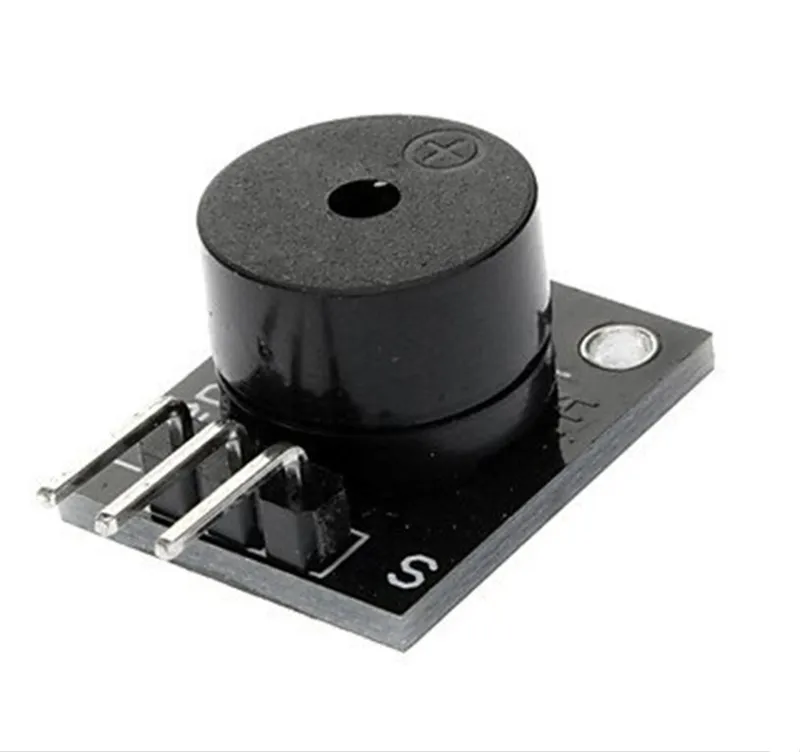
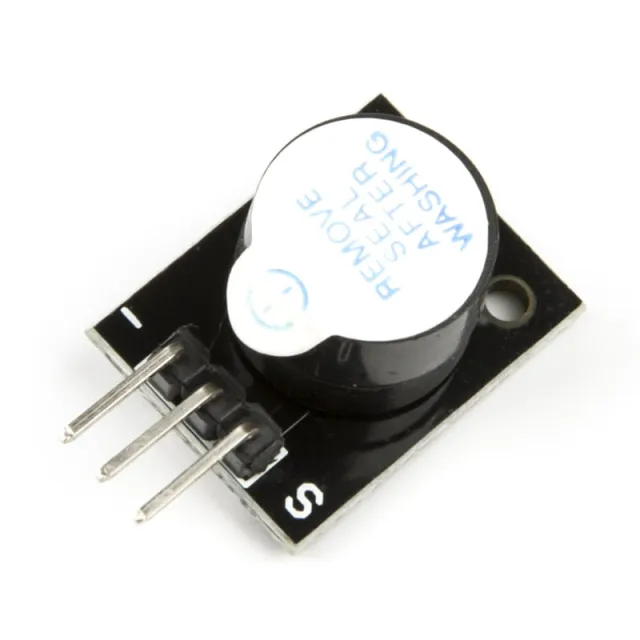
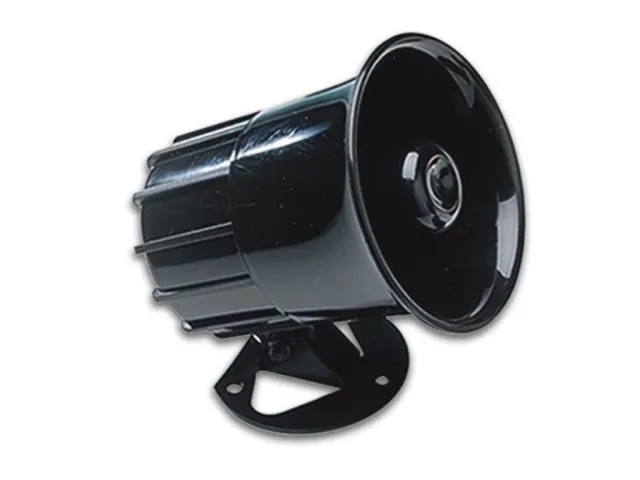
Denne passive buzzer giver en tone på omkring 85db, når den tilsluttes en spænding mellem 4V og 8V. Til denne passive buzzer kræves en mikrocontroller for at få buzzer'en til at afgive lyd via et PWM-signal. Buzzer'en bruger ca. 30mA.
Voltage: 5V
Velegnet til bl.a. Arduino
Afmetingen
Lengte: 2,5cm
Breedte: 1,5cm
Hoogte: 1,1cm
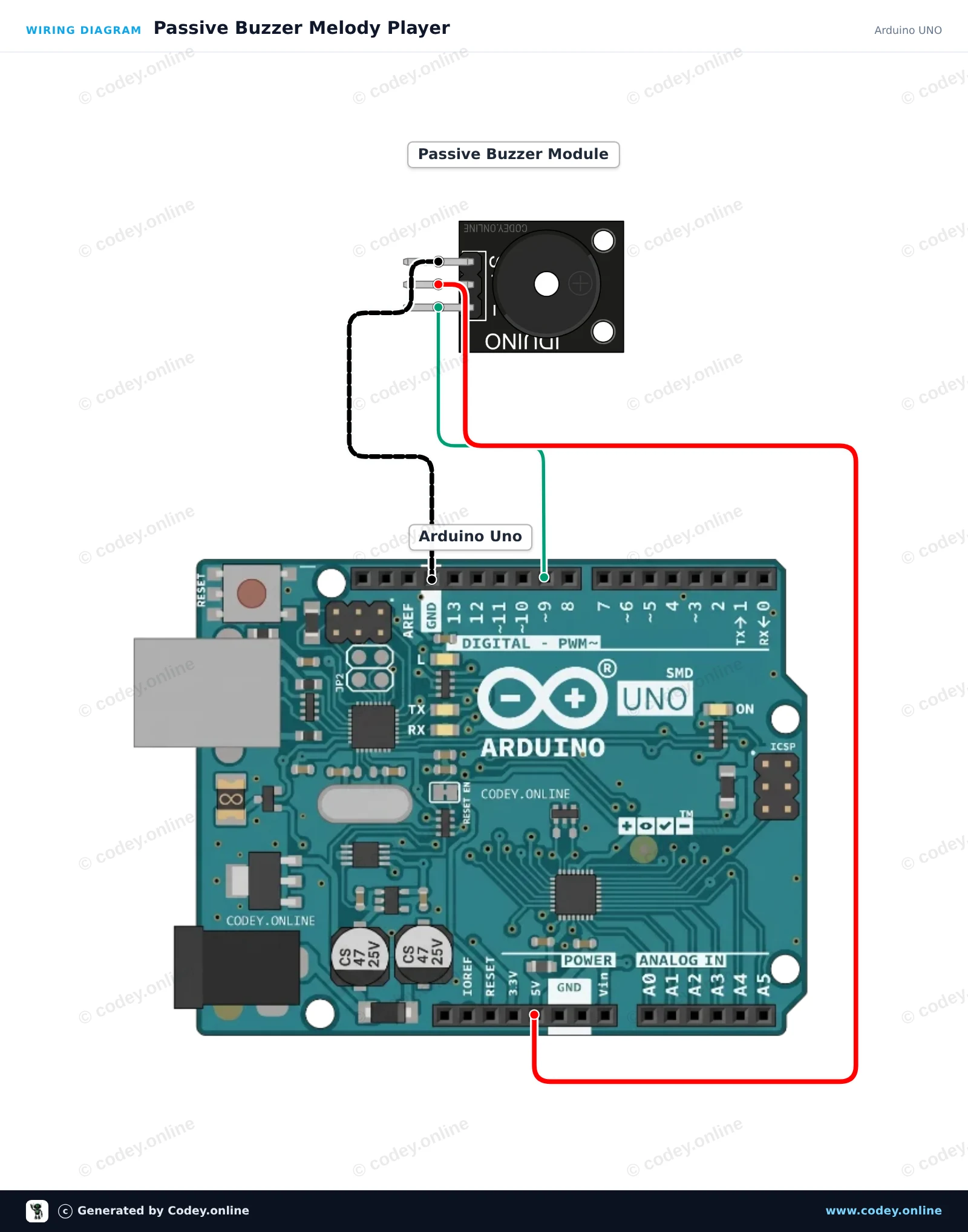
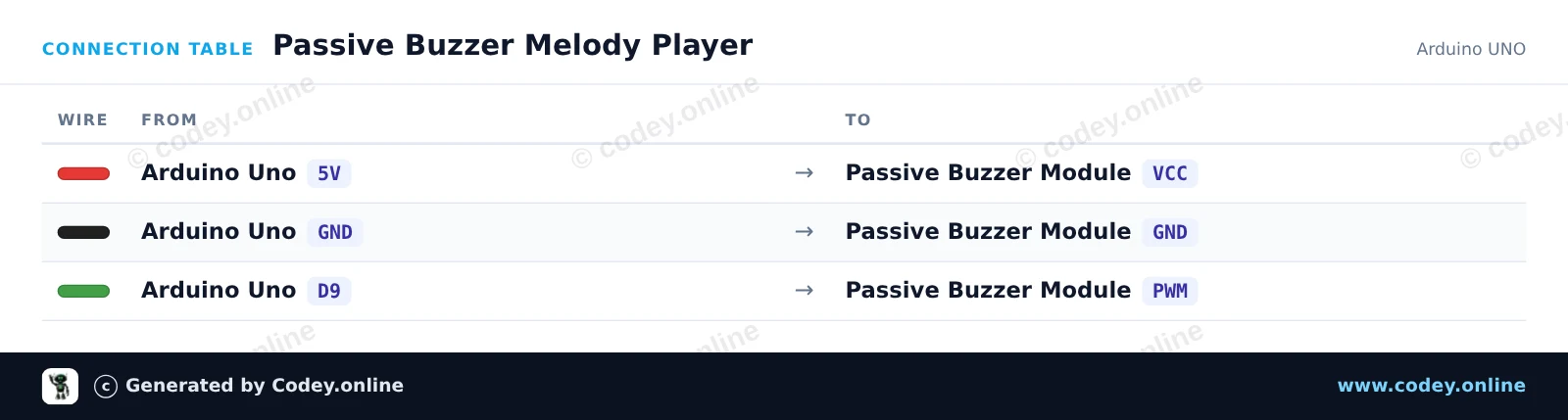
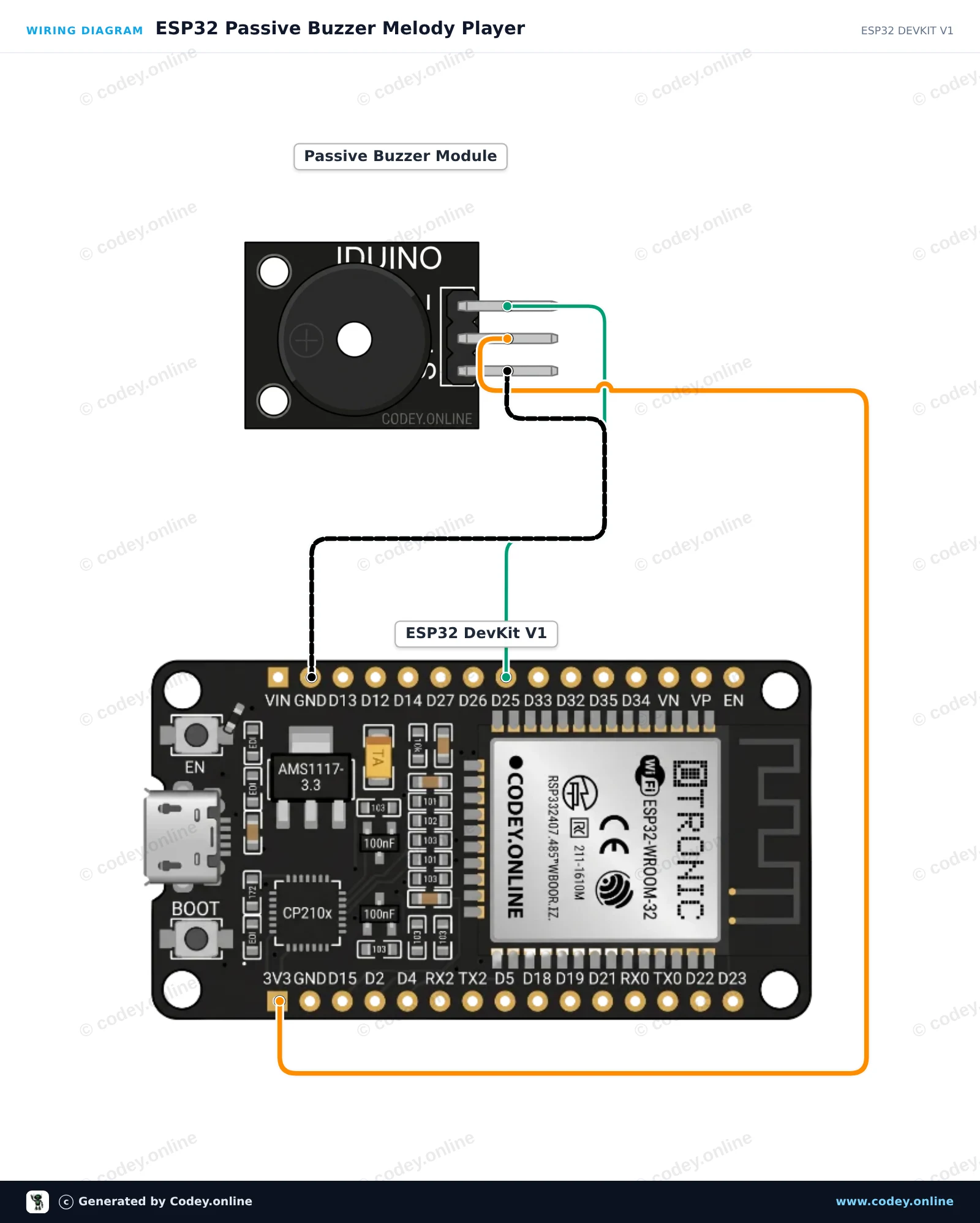
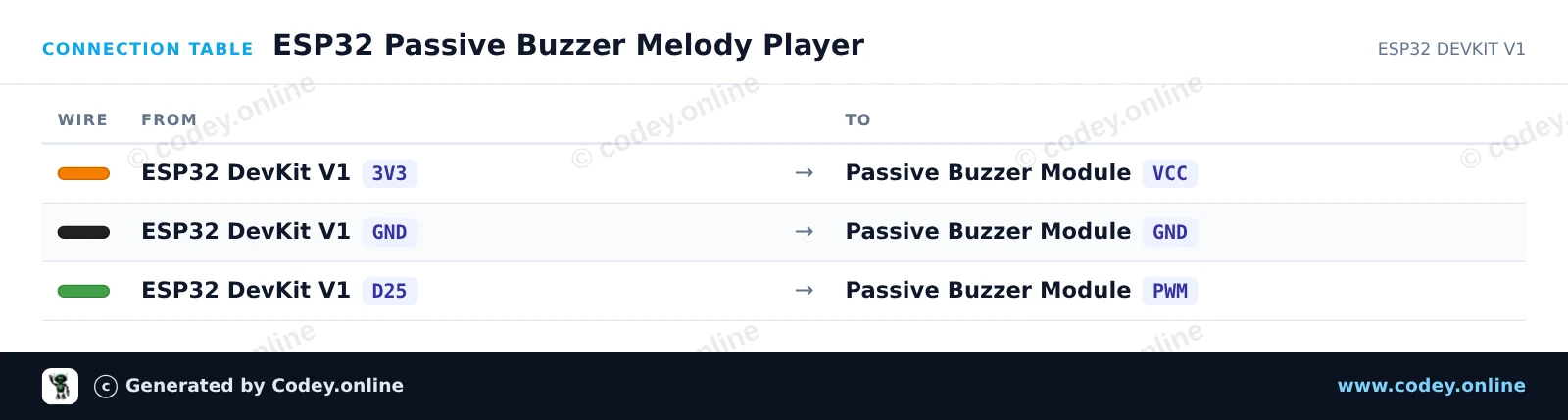
Sådan tilslutter du Passiv buzzer-modul til Arduino til en Arduino UNO eller ESP32, med en eksempelsketch, du kan uploade med det samme.
Dette projekt viser, hvordan man kan generere musikalske toner med et passivt buzzer-modul ved hjælp af en Arduino Uno. Arduinoen udsender signaler med variabel frekvens via tone()-funktionen for at spille en musikalsk skala. Åbn Serial Monitor ved 115200 baud for at se de frekvenser, der afspilles lige nu.
/*
 * ==================================================================
 *  Generated by Codey.online  —  https://www.codey.online
 * ==================================================================
 *  Project   : Passive Buzzer Melody Player
 *  Board     : Arduino UNO (arduino:avr:uno)
 *  Parts     : Buzzer module passief Arduino
 *  Libraries : none (built-in)
 *
 *  Codey Online is an AI-powered browser IDE for Arduino and ESP32.
 *  Describe your project and Codey writes the code, draws the wiring
 *  diagram and uploads it to your board, straight from the browser.
 *  This code is free to use, modify and share, without warranty.
 * ==================================================================
 */

// Passive Buzzer Module Demo on Arduino Uno
const int BUZZER_PIN = 9;

// Musical notes in Hertz (C major scale: C4 to C5)
const int notes[] = {262, 294, 330, 349, 392, 440, 494, 523};
const int noteCount = sizeof(notes) / sizeof(notes[0]);

void setup() {
  Serial.begin(115200);
  Serial.println(F("Passive Buzzer Demo Starting..."));
}

void loop() {
  Serial.println(F("Playing scale ascending..."));
  for (int i = 0; i < noteCount; i++) {
    Serial.print(F("Tone: "));
    Serial.print(notes[i]);
    Serial.println(F(" Hz"));
    tone(BUZZER_PIN, notes[i], 150);
    delay(200);
  }

  delay(300);

  Serial.println(F("Playing scale descending..."));
  for (int i = noteCount - 1; i >= 0; i--) {
    tone(BUZZER_PIN, notes[i], 150);
    delay(200);
  }

  noTone(BUZZER_PIN);
  delay(1500);
}Wiring diagram and example code generated by Codey.online — https://www.codey.online
Dette eksempel viser, hvordan man genererer musiktoner med et passivt buzzer-modul ved hjælp af en ESP32. Mikrocontrolleren bruger PWM-tongenerering til at afspille en sekvens af musikalske toner gentagne gange. Tilslut buzzer-modulet direkte til strøm, stel og en GPIO-pin for at høre melodien.
/*
 * ==================================================================
 *  Generated by Codey.online  —  https://www.codey.online
 * ==================================================================
 *  Project   : ESP32 Passive Buzzer Melody Player
 *  Board     : ESP32 DEVKIT V1 (esp32:esp32:esp32doit-devkit-v1)
 *  Parts     : Buzzer module passief Arduino
 *  Libraries : none (built-in)
 *
 *  Codey Online is an AI-powered browser IDE for Arduino and ESP32.
 *  Describe your project and Codey writes the code, draws the wiring
 *  diagram and uploads it to your board, straight from the browser.
 *  This code is free to use, modify and share, without warranty.
 * ==================================================================
 */

// Pin connected to the passive buzzer's PWM input
const int BUZZER_PIN = 25;

// Frequencies in Hz for a simple arpeggio
const int melody[] = {262, 330, 392, 523};
const int noteDurations[] = {250, 250, 250, 400};

void setup() {
  Serial.begin(115200);
  pinMode(BUZZER_PIN, OUTPUT);
  Serial.println("ESP32 Passive Buzzer Demo Started!");
}

void loop() {
  Serial.println("Playing melody...");

  for (int i = 0; i < 4; i++) {
    tone(BUZZER_PIN, melody[i], noteDurations[i]);
    delay(noteDurations[i] * 1.30); // Pause between notes
    noTone(BUZZER_PIN);
  }

  delay(2000); // Wait 2 seconds before playing again
}Wiring diagram and example code generated by Codey.online — https://www.codey.online






 English
  Nederlands
  Frans
Frans  Deutsch
  Italiano
  Español
  Suomi
Suomi  Polski
  Ελληνικά
  Български
  Čeština
  Hrvatski
  Svenska
  Aileen