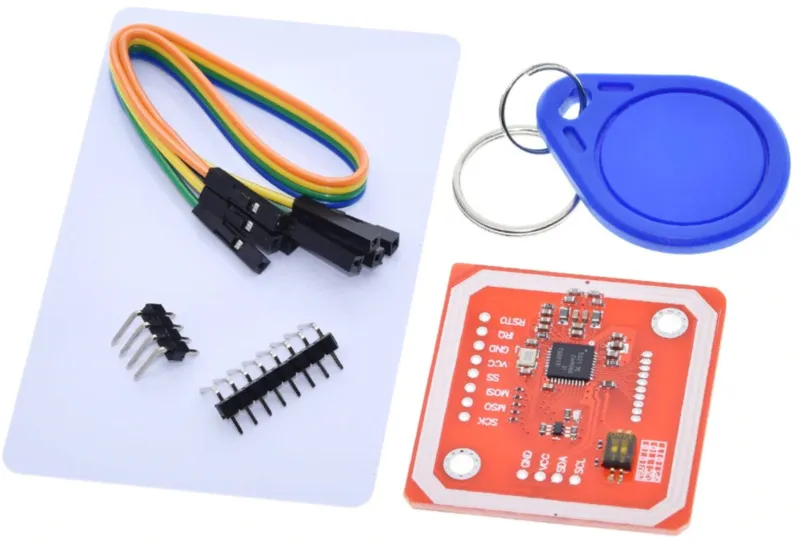
SKU: OT2053-D82 Varenummer: NA144 EAN: 8499705714510

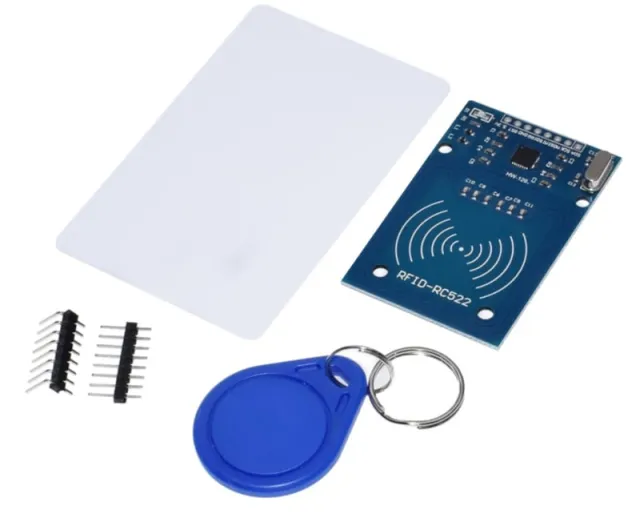
Denne PN532 RFID-modul kan ud over at sende og modtage Mifare-tags også selv sende data via NFC.
Modulet kan styres via SPI, I2C eller UART.
Specifikationer:
Søgetermer: rfid, rfid kit, rfid-kit, rfid set, nfc set, nfc kit
Dimensioner
Lengde: 4,3cm
Bredde: 4cm
Højde: 0,3cm
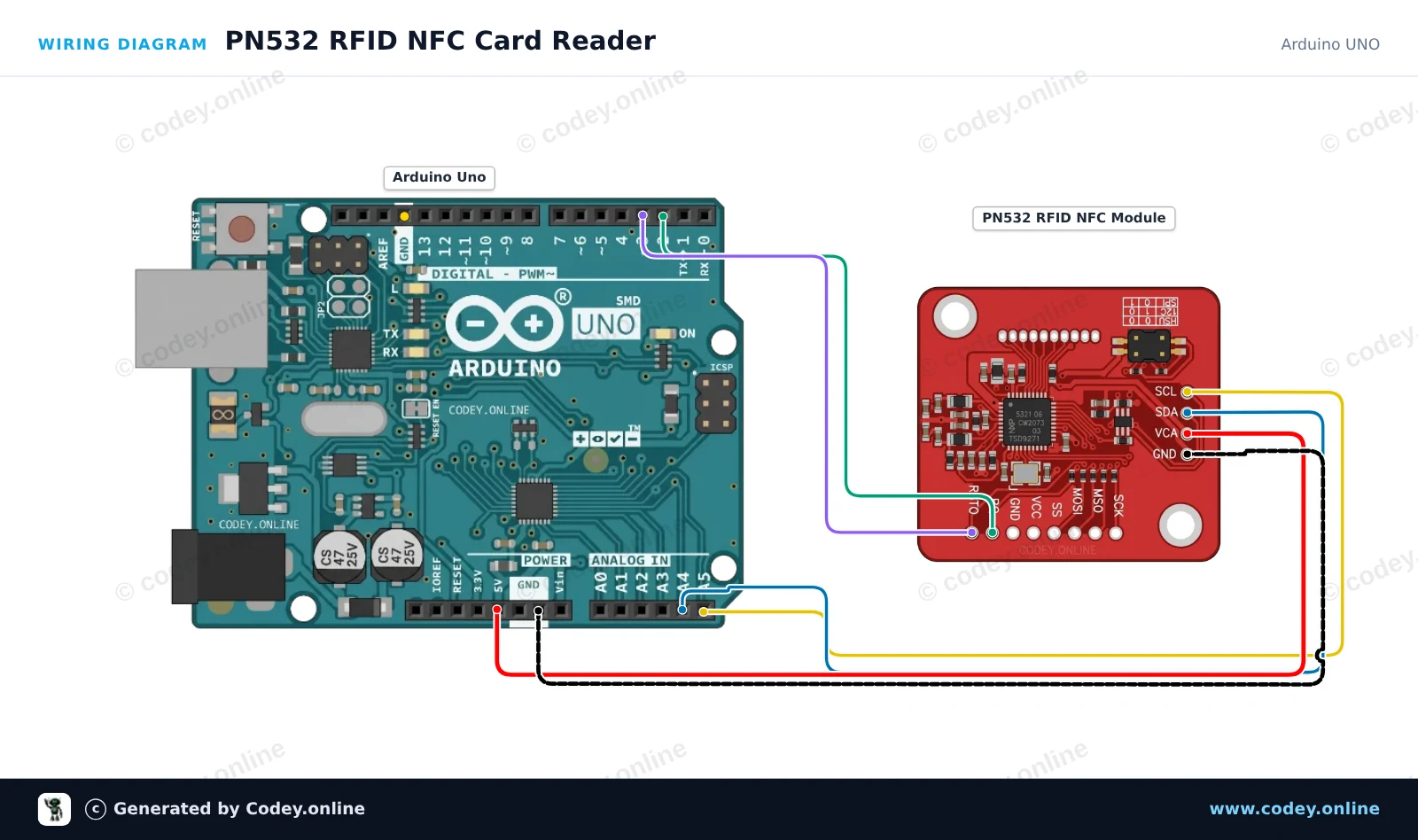
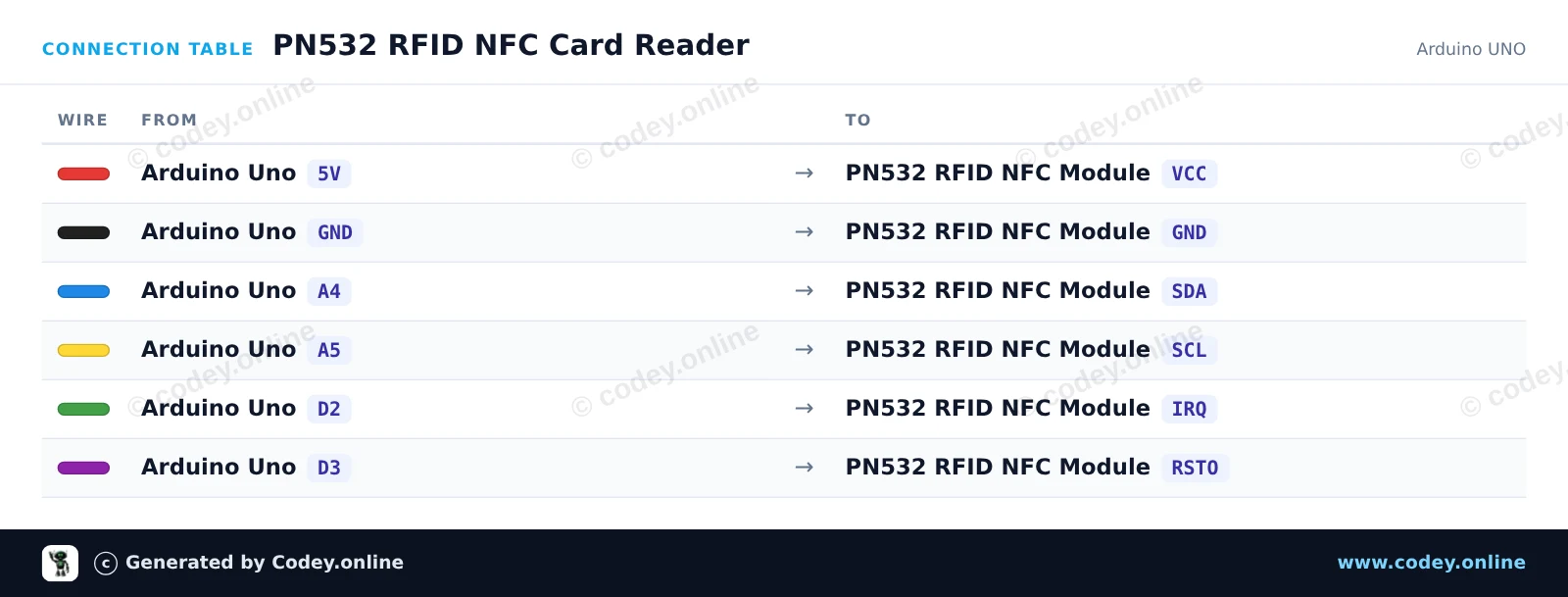
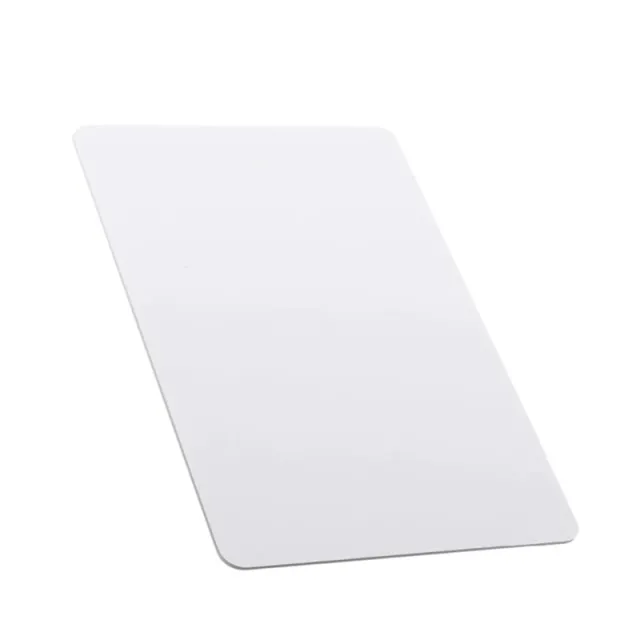
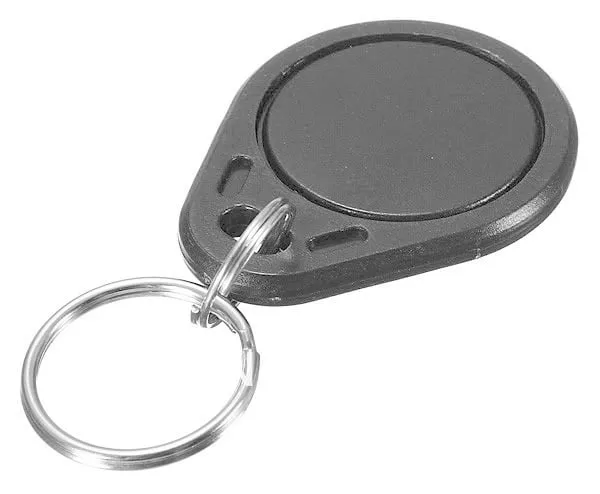
Sådan tilslutter du PN532 RFID NFC Kit med S50 Kort og S50 Nøglebrik til en Arduino UNO eller ESP32, med en eksempelsketch, du kan uploade med det samme.
Dette eksempel læser RFID/NFC-tags (såsom Mifare-kort) ved hjælp af PN532-modulet over I2C. Sørg for, at DIP-kontakterne på PN532-modulet er indstillet til I2C-tilstand (typisk CH1=ON, CH2=OFF). Hold en kompatibel 13.56MHz NFC- eller RFID-tag tæt på modulet for at udskrive dens unikke UID i Serial Monitor.
/*
 * ==================================================================
 *  Generated by Codey.online  —  https://www.codey.online
 * ==================================================================
 *  Project   : PN532 RFID NFC Card Reader
 *  Board     : Arduino UNO (arduino:avr:uno)
 *  Parts     : PN532 RFID NFC Module
 *  Libraries : Adafruit PN532 1.3.4
 *
 *  Codey Online is an AI-powered browser IDE for Arduino and ESP32.
 *  Describe your project and Codey writes the code, draws the wiring
 *  diagram and uploads it to your board, straight from the browser.
 *  This code is free to use, modify and share, without warranty.
 * ==================================================================
 */

#include <Wire.h>
#include <Adafruit_PN532.h>

#define PN532_IRQ   2
#define PN532_RESET 3

Adafruit_PN532 nfc(PN532_IRQ, PN532_RESET);

void setup() {
  Serial.begin(115200);
  while (!Serial) delay(10);

  Serial.println(F("Initializing PN532 NFC Module..."));
  nfc.begin();

  uint32_t versiondata = nfc.getFirmwareVersion();
  if (!versiondata) {
    Serial.println(F("PN532 board not found. Check wiring and I2C mode switch."));
    while (1) delay(10);
  }

  Serial.print(F("Found PN532 chip! Firmware ver: "));
  Serial.print((versiondata >> 24) & 0xFF, HEX);
  Serial.print('.');
  Serial.println((versiondata >> 16) & 0xFF, HEX);

  nfc.SAMConfig();
  Serial.println(F("Waiting for an ISO14443A card or tag..."));
}

void loop() {
  uint8_t uid[7];
  uint8_t uidLength = 0;

  bool success = nfc.readPassiveTargetID(PN532_MIFARE_ISO14443A, uid, &uidLength, 500);
  if (success) {
    Serial.print(F("Found tag! UID: "));
    for (uint8_t i = 0; i < uidLength; i++) {
      if (uid[i] < 0x10) Serial.print('0');
      Serial.print(uid[i], HEX);
      if (i < uidLength - 1) Serial.print(':');
    }
    Serial.println();
    delay(1000);
  }
}Nødvendige biblioteker: Adafruit PN532 1.3.4
Wiring diagram and example code generated by Codey.online — https://www.codey.online
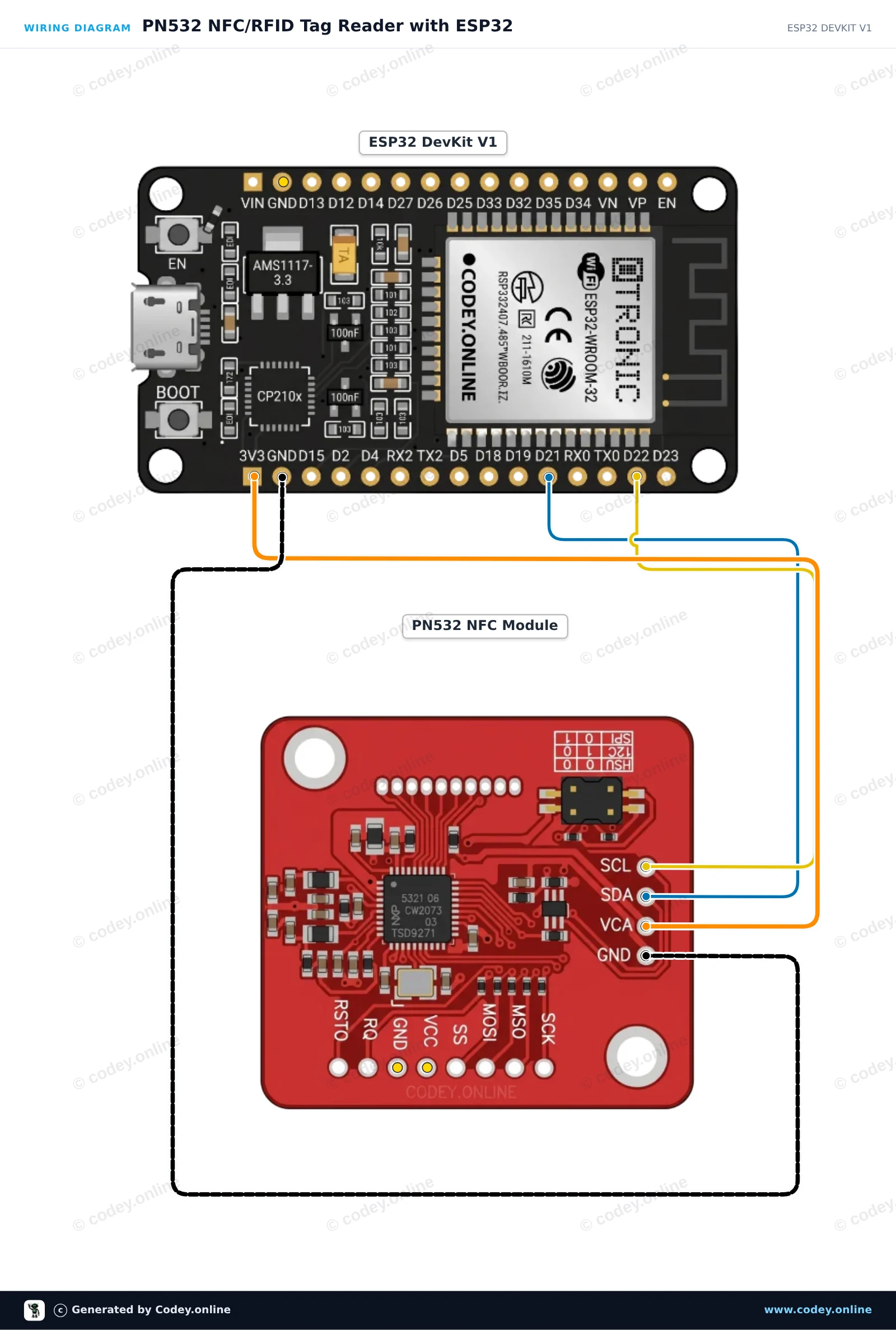
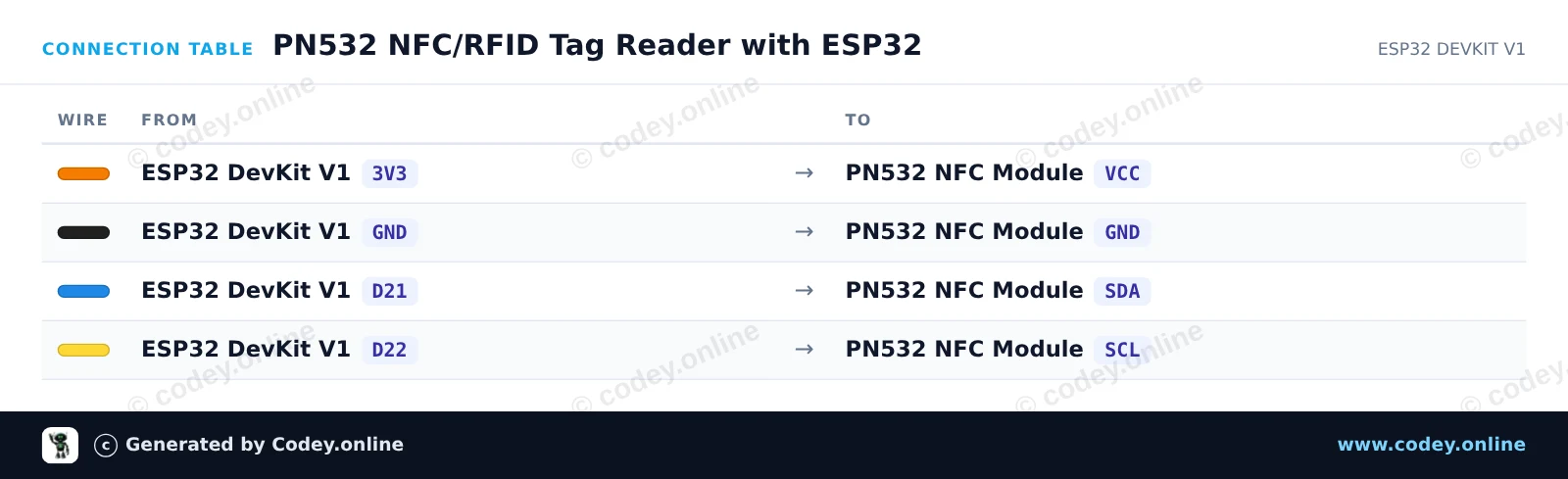
Dette kredsløb forbinder PN532 NFC/RFID-modulet til ESP32 via I2C for at læse standard 13.56 MHz RFID-tags eller NFC-kort. Sørg for, at modulets DIP-switches er indstillet til I2C-tilstand (Channel 0=HIGH, Channel 1=LOW). Når et kort eller en nøglebrik placeres tæt på antennen, læser ESP32 dets unikke ID (UID) og viser det i Serial Monitor.
/*
 * ==================================================================
 *  Generated by Codey.online  —  https://www.codey.online
 * ==================================================================
 *  Project   : PN532 NFC/RFID Tag Reader with ESP32
 *  Board     : ESP32 DEVKIT V1 (esp32:esp32:esp32doit-devkit-v1)
 *  Parts     : PN532 RFID NFC Module
 *  Libraries : Adafruit PN532 1.3.4
 *
 *  Codey Online is an AI-powered browser IDE for Arduino and ESP32.
 *  Describe your project and Codey writes the code, draws the wiring
 *  diagram and uploads it to your board, straight from the browser.
 *  This code is free to use, modify and share, without warranty.
 * ==================================================================
 */

#include <Wire.h>
#include <Adafruit_PN532.h>

// Use I2C interface without dedicated IRQ/Reset pins
#define PN532_IRQ   (-1)
#define PN532_RESET (-1)

Adafruit_PN532 nfc(PN532_IRQ, PN532_RESET);

void setup() {
  Serial.begin(115200);
  while (!Serial) delay(10);

  Serial.println("Initializing PN532 NFC Reader...");
  nfc.begin();

  uint32_t versiondata = nfc.getFirmwareVersion();
  if (!versiondata) {
    Serial.println("PN532 not found! Check DIP switches (I2C mode) and wiring.");
    while (1) delay(100);
  }

  Serial.print("Found PN532 chip with firmware version: ");
  Serial.print((versiondata >> 16) & 0xFF, DEC);
  Serial.print('.');
  Serial.println((versiondata >> 8) & 0xFF, DEC);

  // Configure Secure Access Module (SAM)
  nfc.SAMConfig();

  Serial.println("Ready! Present an RFID card or NFC tag to the reader...");
}

void loop() {
  uint8_t success;
  uint8_t uid[] = { 0, 0, 0, 0, 0, 0, 0 };
  uint8_t uidLength;

  // Wait up to 500ms for an ISO14443A card
  success = nfc.readPassiveTargetID(PN532_MIFARE_ISO14443A, uid, &uidLength, 500);

  if (success) {
    Serial.println("Card detected!");
    Serial.print("UID Length: ");
    Serial.print(uidLength, DEC);
    Serial.println(" bytes");
    Serial.print("UID: ");
    nfc.PrintHex(uid, uidLength);
    Serial.println();

    delay(1000); // Debounce to avoid repeated rapid reads
  }
}Nødvendige biblioteker: Adafruit PN532 1.3.4
Wiring diagram and example code generated by Codey.online — https://www.codey.online









 English
  Nederlands
  Frans
Frans  Deutsch
  Italiano
  Español
  Suomi
Suomi  Polski
  Ελληνικά
  Български
  Čeština
  Hrvatski
  Svenska
  Aileen